How to Integrate HubSpot with Power BI for Custom Object Analytics
Why Build a HubSpot Data Integration?
HubSpot is a powerful CRM, but its built-in reporting has limits:
- Custom objects aren't fully accessible in standard reports
- Multi-entity aggregation (comparing across companies, deals, or custom objects) is difficult
- Historical trend analysis is limited without a data warehouse
- Cross-system analytics (combining HubSpot with other data sources) isn't possible
If you need to answer questions like "What's our application-to-enrollment conversion rate by school?" or "Which lead sources produce the most revenue?" — you need your HubSpot data in an analytics platform like Power BI.
What HubSpot Data Can You Extract?
The HubSpot API provides programmatic access to nearly everything in your CRM:
Standard Objects
- Contacts: People, their properties, and lifecycle stages
- Companies: Organizations and their attributes
- Deals: Pipeline stages, amounts, close dates
- Tickets: Support requests and resolution data
- Associations: Links between contacts, companies, and deals
Custom Objects & Metadata
- Custom Objects: Your domain-specific entities (applications, enrollments, projects, etc.)
- Lifecycle Events: Timestamped stage transitions
- Engagement Data: Emails, calls, meetings, notes
- Form Submissions: Lead capture and conversion data
- List Memberships: Segmentation and targeting lists
The Power of Custom Objects
If you're using HubSpot custom objects (like applications, enrollments, projects, or subscriptions), extracting them via API is often the only way to build comprehensive analytics. HubSpot's reporting tools have limited support for custom object analysis.
HubSpot Integration Architecture
A typical HubSpot to Power BI integration follows this pattern:
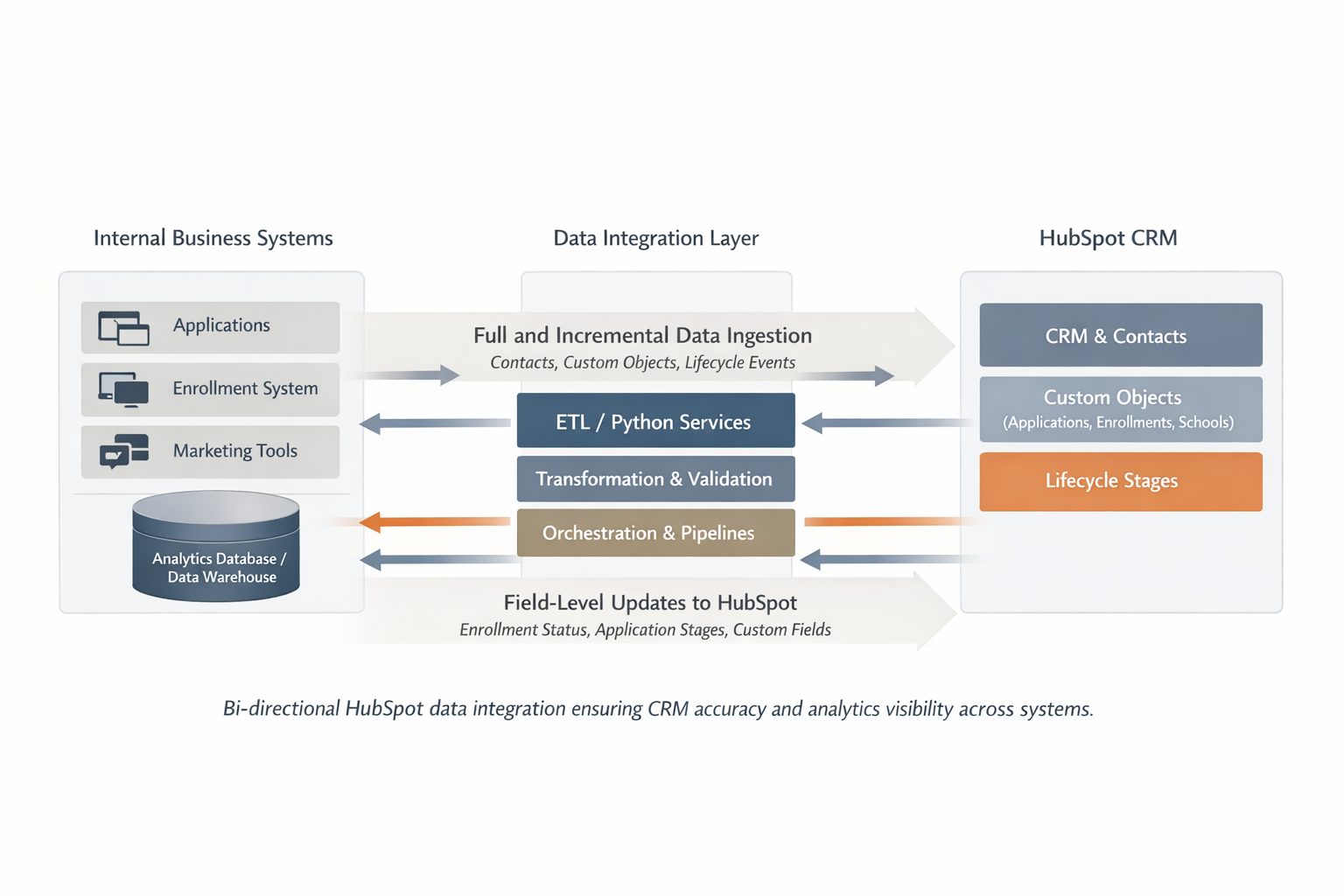
1. Data Extraction
Use HubSpot API to extract contacts, custom objects, associations, and lifecycle events
2. Transformation & Loading
Clean, validate, and load data into an analytics database (Snowflake, BigQuery, etc.)
3. Power BI Connection
Connect Power BI to your data warehouse for flexible, fast dashboard building
Key Implementation Considerations
Incremental vs Full Loads
For ongoing integrations, use incremental loading:
- Extract only records modified since last run
- Reduces API calls and processing time
- HubSpot provides "recently modified" endpoints
- Store "last sync timestamp" to track progress
API Rate Limits
HubSpot enforces rate limits based on your subscription:
- Free/Starter: 100 requests per 10 seconds
- Professional: 150 requests per 10 seconds
- Enterprise: 200 requests per 10 seconds
- Implement retry logic and respect rate limit headers
Data Validation & Quality Checks
Critical for trustworthy dashboards:
- Schema drift detection (catch API changes)
- Record count reconciliation
- Missing required field alerts
- Association integrity checks
- Duplicate detection
- Automated data quality reports
What Analytics Become Possible?
Once HubSpot data is in Power BI, you can build dashboards that aren't possible in HubSpot alone:
Sales & Pipeline Analytics
- Multi-stage funnel analysis with drop-off rates
- Deal velocity and time-in-stage metrics
- Win/loss analysis by source, industry, or rep
- Historical pipeline health trends
Marketing Performance
- Lead source ROI and conversion rates
- Campaign performance across touchpoints
- Time-to-contact and response time analysis
- Content engagement correlation with pipeline
Custom Object Reporting
- Application completion rates by source
- Enrollment funnel with multi-school aggregation
- Project delivery timeline analysis
- Subscription churn and renewal metrics
Cross-System Insights
- Combine HubSpot with Salesforce or other CRMs
- Match CRM data with product usage analytics
- Correlate marketing spend with revenue
- Customer lifetime value analysis
Real-World Example: Charter School Enrollment
I built a HubSpot integration for a charter school organization that needed visibility into their enrollment funnel across 10+ schools.
What Was Extracted
- Contacts (prospective students and parents)
- Custom objects: Applications, Enrollments, School Associations
- Lifecycle stage transitions (Lead → Application → Enrolled)
- Engagement data (emails, calls, meetings)
What Dashboards Revealed
- 22% of leads were untouched — previously invisible in HubSpot
- Application completion varied wildly by school (40% to 75%)
- Average time-to-first-contact was 4.5 days — far too slow
- Certain lead sources had 3x higher enrollment rates
Business Impact
With this visibility, the organization reduced untouched leads by 22%, improved time-to-contact by 18%, and saw an estimated 6-9% increase in enrollments — representing 25-35 additional students for a school enrolling ~400 annually.
Should You Build or Buy a HubSpot Integration?
Consider Pre-Built Solutions When:
- You only need standard HubSpot objects
- Your analytics requirements are straightforward
- You don't need custom transformations
- Budget is limited
Options: HubSpot's native Power BI connector, Fivetran, Stitch, Airbyte
Build Custom When:
- You're using HubSpot custom objects
- You need complex transformations or business logic
- You're combining HubSpot with other data sources
- Pre-built connectors don't support your use case
Best for: Organizations with specific analytics requirements that off-the-shelf tools can't address
Common Technical Stack
Most HubSpot integrations use a similar technical approach:
Data Extraction
- Python with requests library
- HubSpot API v3
- OAuth 2.0 authentication
Orchestration
- Airflow or Prefect for scheduling
- AWS Lambda for serverless
- Kubernetes for containerized
Data Warehouse
- Snowflake, BigQuery, or Redshift
- dbt for transformations
- Schema design for analytics
Visualization
- Power BI Desktop & Service
- Direct Query or Import mode
- Incremental refresh setup
The Bottom Line
A well-built HubSpot data integration doesn't just move data — it reveals lost opportunities, improves follow-up, and gives teams the clarity they need to act.
If your team is asking questions that HubSpot's reporting can't answer — especially around custom objects or multi-entity aggregation — it's time to consider an integration.